Shimmer Loading GIF: How It Works, Benefits, and Best Practices
When a website or app needs a few seconds to load content, showing users a blank screen can make the interface feel broken or unresponsive. A loading indicator provides feedback, but a simple spinner does not always show what is coming next.
This is where a shimmer loading GIF or CSS shimmer effect can help.
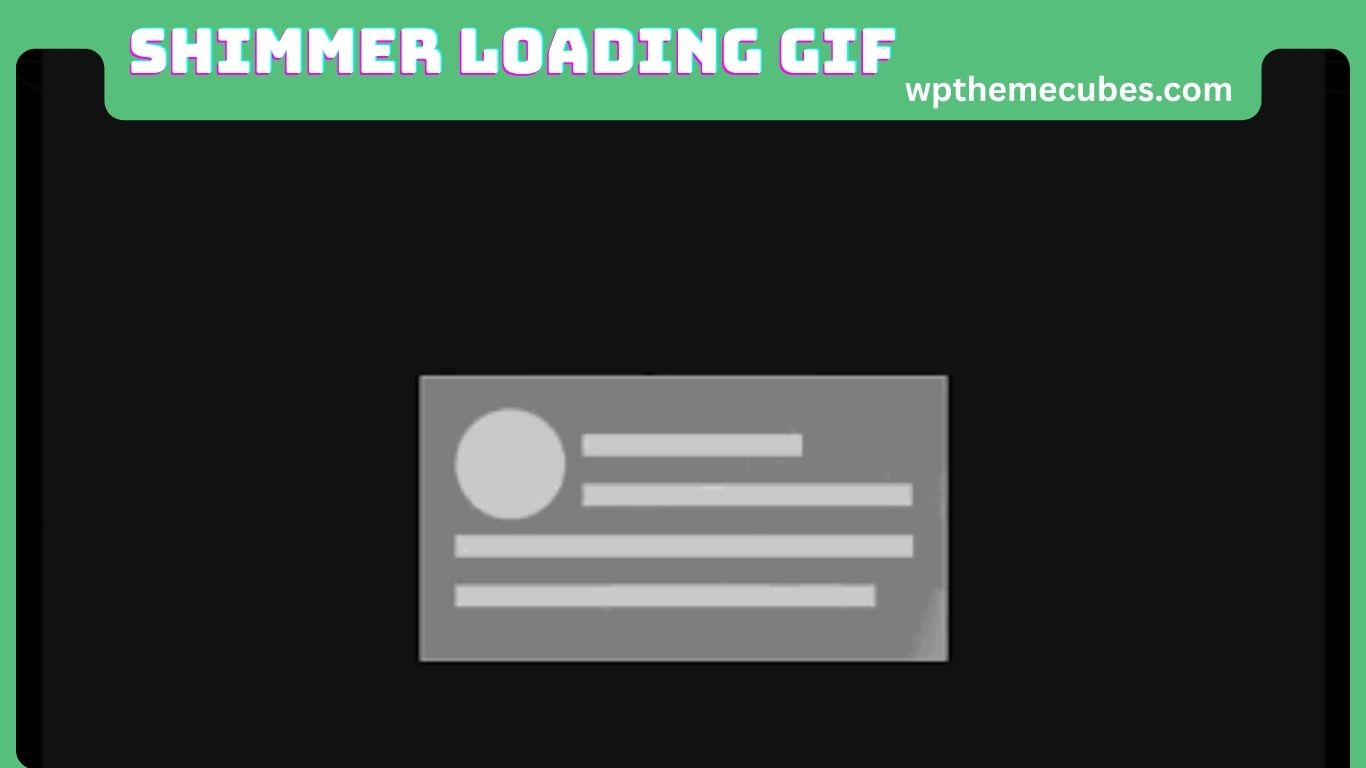
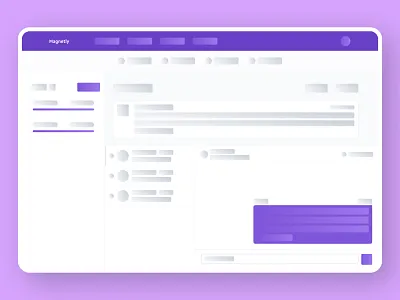
A shimmer loading effect displays temporary placeholder shapes that resemble the content being loaded. A soft highlight moves across the placeholders, giving users a visual signal that the interface is working.
Shimmer loading is commonly used with skeleton screens, skeleton loaders, animated placeholders, and content loading components. Although people still search for “shimmer loading GIF,” modern websites often create the same effect with CSS instead of an actual GIF file.
CSS is usually easier to customize, responsive, and better suited to accessibility and modern design systems. It also makes it easier to respect a user’s reduced-motion preference.
This guide explains what a shimmer loading GIF is, how it works, when to use it, how it compares with other loading patterns, and how to create a lightweight and accessible shimmer effect.
What Is a Shimmer Loading GIF?
A shimmer loading GIF is an animated visual placeholder used while content is loading.
It normally consists of simple shapes in a neutral color with a lighter highlight that moves across them. These shapes may represent an image, title, price, profile picture, paragraph, button, or other interface element.
For example, an e-commerce product card might show:
- A rectangular image placeholder
- Two lines representing the product name
- A short price placeholder
- A button-shaped placeholder
- A moving highlight across the card
The user does not see the actual product information yet, but they can immediately understand the expected structure.
A shimmer does not normally show loading progress as a percentage. Instead, it communicates that content is being prepared.
It is also important to understand that a shimmer effect does not have to be a GIF. On modern websites, developers can create the effect with CSS gradients and animations, which provides more control over appearance, timing, responsiveness, and motion preferences.
Shimmer Loading GIF vs. Skeleton Loader
The terms “shimmer” and “skeleton loader” are closely related but describe different parts of the loading experience.
A skeleton loader is the placeholder structure shown before the real content appears.
A shimmer is the animated visual effect applied to that structure.
In simple terms:
- Skeleton loader = placeholder structure
- Shimmer = moving highlight effect
- Shimmer loading GIF = an animated shimmer asset stored as a GIF
For example, a news website may display a large rectangle for an article image and several horizontal lines for the headline and summary. If a gradient moves across those shapes, the skeleton becomes a shimmer skeleton.
This distinction matters because developers do not necessarily need an image file to create the effect. CSS can produce the animation directly.
How Does a Shimmer Loading GIF Work?
The process is straightforward.
Also Read:Blessed Upgrade Scroll: Complete Guide to Safe Upgrades
First, an application starts requesting data from a server or another source.
Second, the interface displays a skeleton or placeholder.
Third, the shimmer animation runs while the content is unavailable.
Fourth, when the data arrives, the application replaces the placeholder with the real content.
The basic flow is:
Request data → Show skeleton → Run shimmer → Receive data → Show content
An actual GIF contains pre-rendered animation frames. The browser displays those frames as an image.
A CSS shimmer works differently. It can use a gradient that is larger than the visible element and move that gradient across the element with a CSS animation.
This makes CSS particularly useful when the shimmer needs to adapt to different screen sizes, themes, or component designs.
JavaScript can control the loading state, but the continuous visual animation does not usually need to be handled by JavaScript. Keeping application state and visual animation separate can make the component easier to maintain.
Why Do Websites Use Shimmer Loading Effects?
The main purpose of shimmer loading is to improve the way users experience waiting.
A blank page gives users very little information. They may wonder whether the website has frozen or whether their connection is working.
A skeleton provides more context because it shows where content will appear.
A shimmer adds subtle movement, making the loading state feel active rather than completely static.
However, perceived performance is not the same as actual performance.
A shimmer does not make an API response faster, reduce image file sizes, improve server response time, or automatically make JavaScript execute faster.
If a website is slow because of poor caching, oversized images, inefficient code, or a slow backend, the underlying problem should still be fixed.
The best approach combines technical performance improvements with a clear loading experience.
What Are the Main Benefits of a Shimmer Loading GIF?
A well-designed shimmer can provide several practical benefits.
It Reduces the Feeling of an Empty Screen
A blank area can create uncertainty. A skeleton immediately tells users that the interface is loading something.
It Shows the Expected Layout
A good skeleton resembles the final interface. Users can see where images, text, buttons, and other elements will appear.
It Can Improve Perceived Responsiveness
Movement can make an interface feel active while the application waits for data.
It Works Well With Predictable Content
Shimmer loading is especially useful for interfaces such as:
- Social feeds
- News websites
- E-commerce stores
- Search results
- Video platforms
- Dashboards
- Profile pages
- Comment sections
- Mobile applications
It Can Help Maintain Layout Stability
A properly sized skeleton can reserve space for content before it arrives. This reduces the chance of large visual movements when images, text, or other elements are inserted.
When Should You Use a Shimmer Loading GIF?
Shimmer works best when the interface knows what the final content will generally look like.
For example, a product card usually has a predictable structure. The application can display placeholders for the image, product name, rating, price, and button while the data loads.
Shimmer may be unnecessary for very short operations.
If content appears almost immediately, displaying a loading animation can make the experience feel slower because users notice the loading state that otherwise would not have been necessary.
A useful rule is to choose the loading pattern based on the task rather than automatically adding shimmer everywhere.
Use a skeleton when the content structure is predictable. Use a spinner or status message when the operation is small or the final result is difficult to predict.
Shimmer Loading GIF vs. Spinner
A spinner and a shimmer skeleton communicate slightly different ideas.
A spinner generally tells users:
“Something is happening.”
A skeleton tells users:
“This is where the content will appear.”
A shimmer skeleton adds movement to that preview.
Spinners can work well for:
- Button actions
- Form submissions
- Small components
- Short operations
- Background processes
- Unknown content
Skeletons are often more suitable for:
- Product grids
- Article pages
- Search results
- Social feeds
- Profile cards
- Dashboards
For a full page of predictable content, several skeleton placeholders can provide more useful context than one spinner in the center of the screen.
Shimmer Loading GIF vs. Static Skeleton
A static skeleton uses placeholder shapes without animation.
This can be a good choice when simplicity and minimal motion are priorities.
A shimmer adds movement, which can make the loading state easier to notice, but animation is not automatically better.
Developers should consider whether the movement provides useful feedback or simply adds visual activity.
Users who have enabled reduced-motion preferences should receive a reduced or static loading experience. The prefers-reduced-motion media query allows websites to detect this preference and change or disable non-essential animation.
How to Create a Shimmer Loading Effect With CSS
A CSS shimmer can be created with a linear gradient and an animation that moves the gradient across the placeholder.
A simple example is:
.skeleton {
background: linear-gradient(
90deg,
#e5e7eb 25%,
#f3f4f6 50%,
#e5e7eb 75%
);
background-size: 200% 100%;
animation: shimmer 1.5s infinite;
}
@keyframes shimmer {
to {
background-position: -200% 0;
}
}
The basic idea is to:
- Create a neutral placeholder.
- Add a lighter gradient.
- Make the gradient wider than the element.
- Move the background position.
- Repeat the animation while the content is loading.
The colors, speed, direction, and gradient width can be adjusted to match the website’s design system.
CSS animation is often a practical choice for this type of effect because it avoids requiring a separate GIF asset and allows the component to adapt to different themes and layouts. MDN also recommends using CSS animations where appropriate for essential DOM animations rather than unnecessarily driving them with JavaScript.
Should You Still Use an Actual Shimmer Loading GIF?
Yes, but only when it makes sense for the environment.
An actual GIF can be useful when:
- The platform does not support custom CSS
- You need a portable visual asset
- You are creating a prototype
- You need a demonstration animation
- The animation will be used outside a normal web interface
For a modern website, however, CSS is often more flexible.
A CSS shimmer can respond to:
- Different screen sizes
- Light and dark themes
- Different component dimensions
- Reduced-motion preferences
- Design-system variables
A GIF is a finished animation file, while CSS can behave like part of the interface itself.
There is also an accessibility consideration: an animation stored inside a GIF cannot respond to CSS prefers-reduced-motion in the same way a CSS-created animation can.
How to Design a Better Shimmer Loading Effect
The quality of a shimmer depends more on thoughtful design than on complicated code.
Match the Final Content
The skeleton should closely resemble the final interface.
If the final image is wide, the placeholder should have a similar shape.
If the final title normally takes two lines, the skeleton can suggest two lines.
If the interface uses rounded cards, the placeholders should generally use similar corners.
The goal is to make the loading state feel like a temporary version of the real interface.
Keep the Highlight Subtle
The moving highlight should be visible without becoming the main focus of the screen.
Very bright or high-contrast movement can be distracting.
Use a Calm Animation Speed
There is no single duration that works for every interface. The correct speed depends on the size of the placeholder, gradient width, layout density, and overall design.
The animation should feel smooth rather than frantic.
Avoid Too Many Animated Elements
Animating every individual element on a large page can create unnecessary processing work.
MDN notes that larger and more numerous animations can require more processing and potentially affect performance.
Use the simplest animation that communicates the loading state effectively.
Shimmer Loading and Mobile Performance
Mobile devices can have less processing power and battery capacity than desktop computers.
Users may also be browsing with:
- Older phones
- Limited memory
- Battery-saving settings
- Cellular connections
- Slower processors
For this reason, shimmer effects should remain lightweight.
Avoid creating dozens of complex independent animations when a simpler effect can achieve the same result.
Developers should also test the loading experience on real mobile devices instead of checking it only on a high-end desktop.
Performance should be considered part of the loading-state design.
Accessibility and Shimmer Loading
A shimmer is primarily a visual effect, so it should not be the only way the loading state is communicated.
Screen-reader users may not see the animation, and decorative placeholder shapes generally do not need to be announced individually.
Instead, developers should provide appropriate semantic information for meaningful loading states.
For example, aria-busy=”true” can be used on a region that is currently being updated and changed when the update is complete, depending on the interface structure.
The exact implementation depends on the application.
The key principle is simple:
Visual animation can show loading, while accessibility semantics communicate loading status.
This keeps decorative animation separate from information that assistive technologies need.
How to Support Reduced Motion
Some users enable reduced motion through their operating-system accessibility settings.
Websites can detect this preference with:
@media (prefers-reduced-motion: reduce) {
.skeleton {
animation: none;
}
}
The placeholder can remain visible as a static shape while the content loads.
Another approach is to replace the moving shimmer with a much less noticeable visual change.
The important point is that non-essential movement should not be forced on users who have specifically requested less animation. Current MDN guidance recommends using prefers-reduced-motion to provide an experience with reduced or removed motion when appropriate.
Shimmer Loading and Layout Stability
One of the most useful aspects of a skeleton is its ability to reserve space for upcoming content.
Consider an image that has not loaded yet.
If no space is reserved, surrounding text may move when the image appears. This creates an unstable layout.
A correctly sized skeleton can reserve approximately the same space as the final image.
When the real content arrives, it can replace the placeholder instead of forcing the entire page to move.
This is why skeleton design should be based on the final layout, not simply on making an attractive loading animation.
Shimmer Loading for E-Commerce Websites
E-commerce websites are a strong use case because product cards often follow predictable patterns.
A product card may include:
- Product image
- Product name
- Rating
- Price
- Discount
- Availability
- Action button
A skeleton can reproduce these areas while product information is being retrieved.
This gives shoppers a visual structure before the actual products appear.
However, developers should not artificially delay product information just to show the shimmer for a certain amount of time.
If the data is ready, show it.
The purpose of shimmer is to improve the waiting experience, not to create additional waiting.
Shimmer Loading for News Websites
News websites may load several types of content at once, including featured stories, article lists, images, categories, and recommendations.
Skeletons can preserve this structure while the content is being retrieved.
For example, a page might show a large placeholder for the featured article and smaller placeholders for the stories below it.
This gives users a sense of the page structure without requiring them to stare at an empty screen.
Shimmer Loading for Social Media Feeds
Social feeds often contain predictable elements such as:
- Profile images
- Usernames
- Post text
- Images or videos
- Reaction controls
- Comments
A skeleton can represent these areas before the post data arrives.
Also Read:Zvodeps: Complete Guide to the Emerging Digital Productivity Concept
However, a feed should not contain an excessive number of animated placeholders.
A small number of carefully designed skeletons can provide enough feedback without making the screen visually noisy.
Shimmer Loading for Dashboards
Dashboards frequently retrieve information from several data sources.
A dashboard may load:
- Revenue
- Sales
- Customer counts
- Charts
- Recent transactions
- Performance metrics
Using a spinner inside every panel can make the dashboard feel fragmented.
Skeletons can preserve the overall structure instead.
A metric card can display a text placeholder, a chart can reserve its area, and a table can show placeholder rows.
This allows the dashboard layout to remain stable while different pieces of information become available.
Shimmer Loading in Mobile Apps
Shimmer loading is also common in mobile applications.
It can work well for predictable lists and content screens such as:
- Shopping apps
- Messaging apps
- Social networks
- Streaming services
- Travel apps
- Delivery apps
- Dashboard-style applications
Mobile screens are smaller, so animation can appear more noticeable.
A subtle shimmer is usually preferable to a strong, high-contrast effect.
The loading state should support the experience rather than compete with the content.
Shimmer Loading With JavaScript
JavaScript is usually best used to control whether the loading state is visible.
A simplified pattern might look like:
const loading = true;
if (loading) {
showSkeleton();
} else {
showContent();
}
In a real application, the loading state would normally be connected to an API request or data-fetching process.
A clean architecture is:
Application state controls visibility.
CSS controls the visual animation.
This separation makes it easier to reuse and maintain the loading component.
Shimmer Loading in React
React applications commonly render a skeleton conditionally while data is loading.
For example:
function ProductCard({ product, loading }) {
if (loading) {
return (
<div
className=”skeleton-card”
aria-hidden=”true”
/>
);
}
return (
<article>
<img src={product.image} alt={product.name} />
<h2>{product.name}</h2>
<p>{product.price}</p>
</article>
);
}
In a production application, the loading region should also have an appropriate accessibility strategy.
The same basic concept can be used with Vue, Angular, Svelte, and other component-based frameworks.
Shimmer Loading With Tailwind CSS
Tailwind CSS can make reusable skeleton components easier to build.
A project can create a shared skeleton component and reuse it for:
- Cards
- Lists
- Tables
- Images
- Avatars
- Text blocks
- Buttons
The main advantage is consistency.
Instead of creating a different loading style for every page, a design system can provide a standard skeleton pattern that works throughout the application.
How Long Should a Shimmer Animation Last?
There is no universal animation duration for every shimmer.
The right timing depends on:
- Placeholder size
- Gradient width
- Number of elements
- Animation direction
- Page density
- Brand style
- User preferences
A good shimmer generally feels smooth and calm.
Test it on different devices instead of judging it only on a powerful desktop computer.
It is also useful to test:
- Mobile screens
- Desktop screens
- Low-end devices
- Slow connections
- Light mode
- Dark mode
- Reduced-motion settings
The shimmer should remain subtle in all of these situations.
Should a Shimmer Repeat Forever?
A shimmer should normally continue only while the content is genuinely loading.
It should not continue indefinitely after a request has failed.
A robust interface should distinguish between different states:
Loading → Success
Loading → Error
Loading → Empty
Loading → Retry
If a request fails, the shimmer should stop and the interface should explain what happened.
An endless animation can otherwise make users think the system is still working when it is actually stuck.
Shimmer Loading and Error States
Loading and error states communicate different information.
A shimmer says:
“Please wait.”
An error state says:
“Something went wrong.”
If an API request fails, continuing to display the shimmer is misleading.
Instead, provide a clear message and, when appropriate, a retry action.
For example:
“Unable to load products. Please try again.”
The retry control should be easy to find and usable with a keyboard or assistive technology.
Common Shimmer Loading Mistakes
Several mistakes can make a shimmer experience worse instead of better.
Using Shimmer Everywhere
Not every loading state requires a skeleton.
Small or nearly instant operations may be better without one.
Making the Animation Too Fast
Rapid movement can become distracting and uncomfortable.
Making the Highlight Too Bright
A high-contrast shimmer can draw more attention than the actual interface.
Ignoring Reduced Motion
Users who request reduced motion should have an appropriate alternative. The prefers-reduced-motion media query is designed for this purpose.
Animating Too Many Elements
Large numbers of animations can increase processing work. Keep the implementation simple whenever possible.
Creating a Skeleton That Does Not Match the Final UI
If the placeholder has very different dimensions from the real content, the interface may shift when loading finishes.
Hiding Poor Performance Behind Animation
A shimmer does not fix a slow website.
It only makes the waiting state clearer.
Delaying Real Content
Never hold back content simply so a shimmer animation can finish.
Show real content as soon as it is ready.
How to Test a Shimmer Loading Effect
Testing should cover both appearance and technical behavior.
Test Different Screen Sizes
Check phones, tablets, laptops, and large desktop screens.
The skeleton should remain aligned with the final content.
Test Slow Connections
A fast connection may make the loading state disappear before you notice problems.
Use slower network conditions to see whether the skeleton still works correctly.
Test API Failures
Force requests to fail and confirm that the shimmer stops and an error state appears.
Test Empty Results
If an API returns no results, the loading state should end and the interface should explain that there is nothing to display.
Test Reduced Motion
Enable the operating system’s reduced-motion setting and confirm that the animation is removed or reduced.
Test Accessibility
Make sure decorative placeholders are not unnecessarily announced and that meaningful loading information is communicated appropriately.
When Should You Avoid a Shimmer Loading GIF?
A shimmer is not always the right choice.
Consider another loading pattern when:
- The operation is almost instant.
- The final content structure is unpredictable.
- The interface contains very little content.
- A progress percentage is important.
- The animation creates unnecessary distraction.
- The user has requested reduced motion.
- The loading process may take a long time without meaningful feedback.
Depending on the situation, a spinner, progress bar, status message, or static skeleton may work better.
Is a Shimmer Loading GIF Good for SEO?
A shimmer loading GIF is not an SEO strategy by itself.
Its main purpose is user experience.
For an SEO-focused website, important content should be delivered in a technically appropriate way and should not depend on an animation for search engines or users to discover the actual information.
Developers should continue to focus on useful content, accessibility, performance, mobile usability, and stable layouts.
The shimmer should support the page rather than become a substitute for real content.
Shimmer Loading GIF Best Practices Checklist
For a professional implementation:
- Match the skeleton to the final layout.
- Keep the shimmer subtle.
- Use CSS when it is more practical than a GIF.
- Keep animations lightweight.
- Avoid unnecessary animated elements.
- Respect prefers-reduced-motion.
- Separate decorative animation from meaningful accessibility information.
- Reserve space for images and major content.
- Stop the shimmer when content arrives.
- Provide clear error states.
- Provide clear empty states.
- Support dark mode when appropriate.
- Test on mobile devices.
- Test on slower connections.
- Test with accessibility tools.
- Avoid using shimmer to hide poor performance.
- Never delay real content just to complete an animation.
Also Read:TrendyWinner Com: Complete Guide to Trending Topics, Website Reviews & Online Insights
Frequently Asked Questions About Shimmer Loading GIF
Is a shimmer loading GIF the same as a skeleton loader?
No. A skeleton loader is the placeholder structure, while shimmer refers to the moving visual effect applied to that structure. A skeleton can also be static.
Does a shimmer loading GIF have to be an actual GIF?
No. Modern websites can create shimmer effects with CSS gradients and animations. CSS can offer greater control over responsive behavior, themes, timing, and reduced-motion preferences.
Is shimmer better than a loading spinner?
It depends on the situation. Shimmer is useful when the final content has a predictable structure, while a spinner can be better for short actions or unknown content.
Does shimmer make a website load faster?
No. Shimmer mainly changes how users experience the waiting period. It does not make servers, APIs, images, or JavaScript inherently faster.
Can a shimmer effect affect website performance?
Yes, if it is overly complex or applied to too many elements. Keeping the animation lightweight and reducing unnecessary motion can help limit processing work.
Conclusion
A shimmer loading GIF is a simple way to make waiting feel more understandable. Instead of showing users an empty screen, it provides a visual preview of the interface that is about to appear.
The most important part, however, is not the animation itself.
A good shimmer should match the final layout, reserve appropriate space, use subtle motion, perform efficiently, and disappear as soon as real content is available.
For modern websites, an actual GIF is often unnecessary. CSS gradients and animations can provide the same basic effect while offering greater control over responsive design, themes, and accessibility.
Reduced-motion support is especially important because modern browsers can detect when users have requested less non-essential movement.
The goal should not be to create the most noticeable loading animation. The goal is to make waiting feel clear, calm, and useful.
When implemented correctly, a shimmer loading GIF or CSS shimmer becomes a small but valuable part of a professional user experience. It communicates that content is being prepared without distracting users or hiding genuine performance problems.